
Overview
This PowerShell-based GUI tool allows administrators to assign or remove Azure AD groups as inclusions or exclusions to Intune-deployed apps. It leverages the Microsoft Graph API to automate and streamline app assignment management and supports both selective and bulk operations.
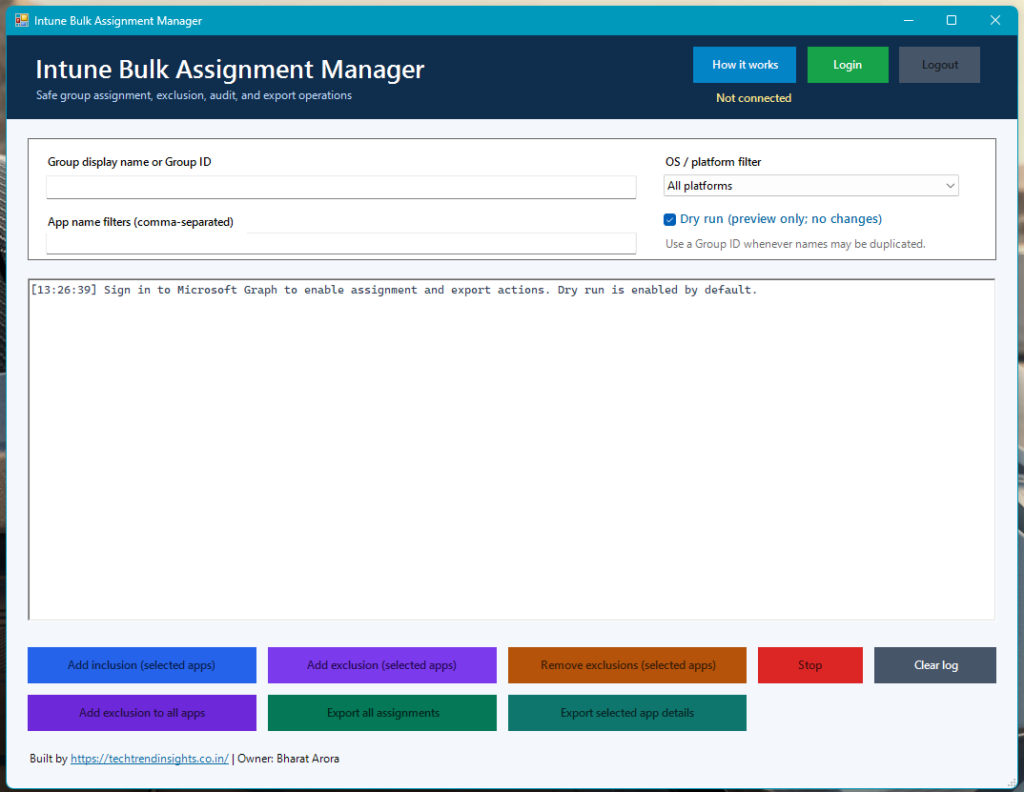
✨ Features
- Click Login and complete the Microsoft Graph sign-in prompt. Assignment and export controls remain unavailable until the session is connected.
- Enter a Group ID where possible. A unique display name is also accepted; duplicate display names are rejected rather than choosing an arbitrary group.
- Enter comma-separated partial app names for selected-app actions.
- Choose an OS / platform filter. It defaults to All platforms; Windows, macOS, iOS/iPadOS, Android, and Other are available.
- Leave Dry run selected to review the intended changes in the log.
- Clear Dry run only after review. The tool asks for confirmation before every write.
- Click Logout when finished to clear the Microsoft Graph session and disable the operational controls.
- Use How it works in the header for an in-app description of every operation.
Operations
| Action | Effect |
|---|---|
| Add inclusion (selected apps) | Adds the group as a required inclusion target for matching apps. |
| Add exclusion (selected apps) | Adds the group as an exclusion target for matching apps. |
| Remove exclusions (selected apps) | Removes only exclusion assignments for the group; required inclusions are preserved. |
| Add exclusion to all apps | Adds the exclusion group to every Intune app. This operation is confirmed before it runs. |
| Export all assignments | Writes Intune-All-App-Assignments.csv to the current user’s Desktop. |
| Export selected app details | Writes matching-app assignments to Intune-Selected-App-Details.csv on the Desktop. |
🛠 Prerequisites
- PowerShell 5.1 or later
- Microsoft Graph PowerShell SDK:Install-Module Microsoft.Graph -Scope CurrentUser
- Required Graph API Permissions (delegated or app):
DeviceManagementApps.ReadWrite.AllGroup.Read.All
🔐 Authentication
The script uses:
Connect-MgGraph -Scopes "DeviceManagementApps.ReadWrite.All", "Group.Read.All"
If authentication fails, a GUI message is shown and execution stops.
🖥️ GUI Layout
| Section | Description |
|---|---|
| Group Name Input | Textbox to enter the target AAD group name |
| App Name Filter | Optional comma-separated app names to filter which apps to process |
| Log Viewer | Real-time console-style output showing action results |
| Buttons | Each triggers a specific action (see below) |
🚀 Button Functions
| Button | Function |
|---|---|
| 🛑 Stop | Aborts long-running operations |
| ➕ Add Inclusion (Selected Apps) | Assigns group as required target to filtered apps |
| 🚫 Add Exclusion (Selected Apps) | Assigns group as exclusion target to filtered apps |
| 🚫 Bulk Exclude Group (All Apps) | Adds exclusion assignment to all apps for the given group |
| 🧹 Bulk Remove Group (All Apps) | Removes all group assignments (inclusion or exclusion) from all apps |
| 🧹 Remove Group (Selected Apps) | Removes group assignment from specified apps only |
| 📤 Export All App Assignments | Outputs a CSV of all app-to-group assignments |
| 📤 Export Selected App Details | Outputs assignment details of only selected apps to CSV |
🧩 Function Definitions
Resolve-AADGroup
Finds the Azure AD group object based on display name.
Get-AppAssignments
Retrieves current group assignments for a given app.
Add-GroupAsInclusionToApps
Adds the group as a required target to filtered apps.
Add-GroupAsExclusionToApps
Adds the group as an exclusion target to filtered apps.
Remove-GroupExclusionFromApps
Removes group assignment from filtered apps.
Add-GroupAsBulkExclusionToAllApps
Adds group as exclusion target to all apps.
Remove-GroupAssignmentFromAllApps
Removes any assignment (inclusion/exclusion) of the group from all apps.
Export-AllAppAssignments
Exports all app assignments across tenant to CSV.
Export-SelectedAppDetails
Exports assignment data of specific apps to CSV.
📄 Output Files
Intune-All-App-Assignments.csvIntune-Selected-App-Details.csv
These are saved to the current user’s Desktop by default.
📌 Tips
- App names do partial match, so
ExcelmatchesExcel 365. - Assignments respect Graph API limits, so large tenants may take a few minutes.
Stopbutton is responsive and halts processing immediately.
🔧 Customization Ideas
- Add filtering by App Type (e.g.,
Win32,iOS). - Add logging to a file (e.g.,
C:\Logs\IntuneAssignmentTool.log). - Add profile-based configuration saving for repeatable operations.
📎 Sample Use Case
Scenario: Add a group Finance Users to all apps containing Office
- Enter
Finance Usersin the group name field. - Enter
Officein the app name filter. - Click
➕ Add Inclusion (Selected Apps).
👨💻 Author & Maintenance
This tool was designed for use by Intune administrators managing large-scale app assignments across environments.
Link to Download Bharat1984/Intune-Bulk-Exclusion-Inclusion